iOS 27 Beta Loophole: How to Get 'Siri AI' and 'Spatial Reframing' Right Now Without Paying Apple
Learn how to install iOS 27 beta and explore new features like Siri AI and Spatial Reframing without paying Apple.

Apple users who want to try iOS 27 beta, complete with the headline 'Siri AI' and 'Spatial Reframing' features, can already install it on their iPhone, iPad or Mac in the UK and elsewhere this week without paying Apple, by enrolling in the company's developer programme and downloading the test software.
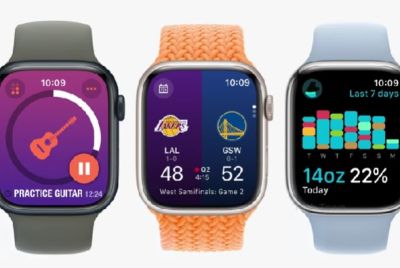
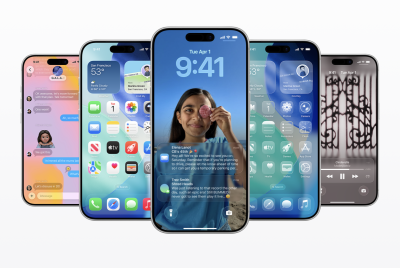
Apple unveiled iOS 27, iPadOS 27 and macOS 27 'Golden Gate' at its WWDC 2026 keynote, then quietly pushed out the first wave of developer betas shortly after the livestream ended. The early versions include the heavily trailed Siri overhaul and new Spatial Reframing tools, alongside updates to watchOS 27, visionOS 27 and tvOS 27. These builds are meant for developers, but Apple's own system now makes it possible for ordinary users to get in through the same doorway, with one important caveat: this is unfinished software, and Apple's small print makes clear that anyone installing it does so at their own risk.
How to Get iOS 27 Beta, Siri AI and Spatial Reframing Without Paying Apple
Apple's route to the iOS 27 beta no longer relies on obscure configuration profiles circulating on forums. Instead, the company has tied access to its official Apple Developer Programme. On paper, this is aimed at people building apps for the App Store. In practice, Apple's own enrolment flow now allows users to sign up, accept the agreement and download developer betas without providing card details.
The process starts at the Apple Developer Programme enrolment page or inside the Apple Developer app. You sign in using your existing Apple ID, supply basic personal details such as your name and contact information, then agree to the developer terms. At this point Apple may steer you towards a payment screen, which is the same path genuine app developers must take if they intend to sell software. According to Apple's current system, however, no payment is required if you are only there for access to the betas rather than publishing apps.
Once your Apple ID is recognised as part of the programme, the iOS 27 beta appears like any other system update on eligible devices. On an iPhone, go to Settings, then General, then Software Update. A 'Beta Updates' option should be visible on that screen. Tapping it brings up a choice of available test builds. Selecting 'iOS 27 Developer Beta' will surface the latest developer beta ready to download. From there, it is a case of following the prompts and waiting while the device restarts and installs the new system.
The same approach works on iPadOS 27 and extends to the Mac. After backing up your Mac, open System Settings, go to General, then Software Update. Next to 'Beta Updates' there is a small 'i' icon. Clicking it opens a drop-down menu. Selecting 'macOS Developer Golden Gate Beta' and then 'Done' tells the system to fetch the macOS 27 Golden Gate beta, which then downloads and installs as a standard update. Apple uses a similar mechanism on its other platforms, so watchOS, visionOS and tvOS betas are surfaced from each device's Software Update menu once the account is marked as a developer account.
The Catch With iOS 27 Beta Access and Why Backups Matter
These iOS 27 beta builds are, by definition, incomplete and potentially unstable. Apple does not guarantee performance or compatibility, and issues can range from quirky animations to crashes, data corruption or apps simply refusing to run.
Apple finally revealed the new Siri — and it runs on a competitor's AI
— Riley West (@rileywestreel) June 8, 2026
The new Siri is built on a custom Google Gemini model: 1.2T parameters, a deal worth ~$1B/year.
A company that spent years building its narrative around on-device and privacy now routes its heaviest queries… https://t.co/Tp6a5OFhnz pic.twitter.com/oG8HKeMPgX
That is why the company repeatedly stresses one step before anything else: back up your device. Before installing the iOS 27 beta on an iPhone or iPad, or macOS 27 Golden Gate on a Mac, users are strongly advised to create a full backup, whether to iCloud or a computer. The same applies across all platforms. If the beta proves unusable, that backup is the only clean route back to a stable public version. Skipping this step is the sort of mistake people only make once.
It is also worth noting that, as of 8 June, this developer route is the only officially sanctioned way to get the first iOS 27 beta and the accompanying test builds of Apple's other new operating systems. Apple is expected to open a separate public beta programme in late July, which usually runs via the Apple Beta Software Programme and does not require joining the full developer programme.
For now, though, anyone keen to live at the bleeding edge of Apple's ecosystem and to explore Siri AI and Spatial Reframing before others see the update prompt has a narrow but accessible window. They must sign up as a developer, back up their devices and accept that early access means playing by beta rules. Nothing about the final quality of these features is confirmed yet, so everything should be taken with a grain of salt until Apple ships the finished versions later in the year.
© Copyright IBTimes 2025. All rights reserved.
- Recommended For You