

Is the Skylight Calendar Worth It for Busy Families?
The Skylight Calendar puts family schedules, chores, lists, and plans on one touchscreen display, giving busy households a shared place to organise everyday life
Family life has a habit of becoming complicated without anyone actually planning for it.
One parent has a work meeting. A child has football practice. Someone needs to remember a dentist appointment, another person has a school event, and dinner still needs to be decided. Add shopping lists, household chores, and weekend plans, and keeping everyone informed can become a job in itself.
For many households, the problem isn't a lack of calendars. It's that everyone has a different one.
Some events live on a parent's phone. Others arrive through school emails, WhatsApp messages, or printed notices. Children may have their own schedules, while household tasks are remembered through a mixture of notes, reminders and conversations.
The Skylight Calendar takes a different approach. It is a Wi-Fi-connected touchscreen designed to give the whole household a shared view of schedules, tasks and lists in one place. It automatically syncs with services including Google, Apple and Outlook, while its companion mobile app allows family members to make updates away from home.
That makes it more than a conventional digital calendar. The bigger idea is to create a visible family organiser that everyone can use.
What Is the Skylight Calendar?
At its core, the Skylight Calendar is a smart family calendar built around a 15-inch Full HD touchscreen.
The display measures 15.8 by 9.9 by 1.4 inches on the current UK-listed 15-inch model and has a 1920 x 1080 resolution. It can sit on a countertop or be mounted on a wall, giving families some flexibility over where it becomes part of their daily routine.
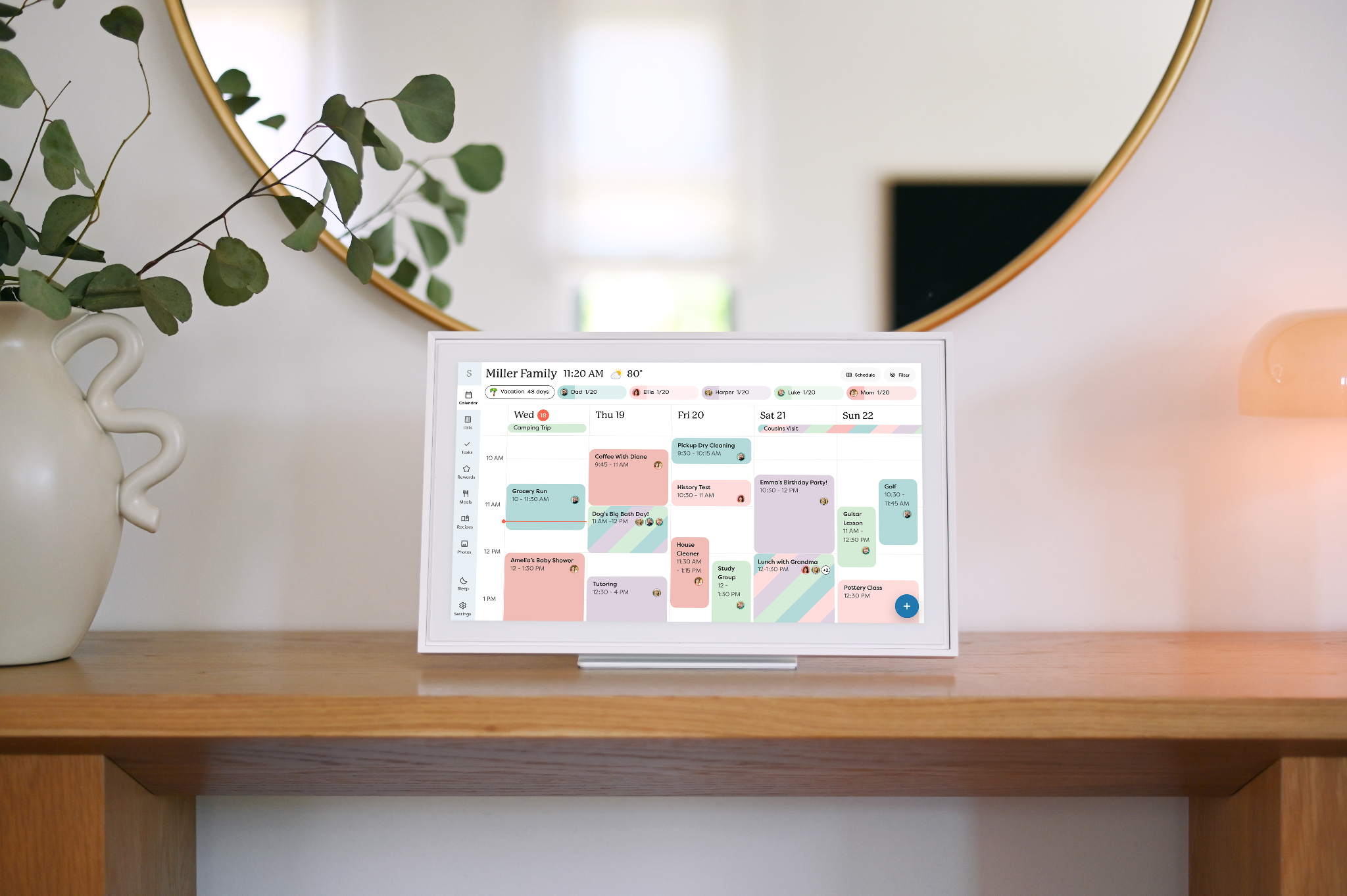
The main display is designed to make a family's schedule easy to understand at a glance. Events can be colour-coded by family member, while users can switch between day, week, month, and schedule views.
That visual approach is one of the product's biggest differences from a conventional calendar app. Instead of requiring someone to open their phone and check an individual schedule, the household's plans can remain visible in a shared space.
It can also connect multiple Skylight Calendars, allowing information to be shared across different rooms or even different households. Users can invite spouses, co-parents, children, and other trusted people to access the calendar as well.
How Does It Help With Family Organisation?
The appeal of a digital family calendar is less about replacing every app a household already uses and more about bringing the information together.
Skylight automatically syncs with major online calendar services, including Google, Apple and Outlook. The company's current comparison information also lists compatibility with Cozi and Yahoo.
That means a family does not necessarily need to abandon the calendars it already uses.
Instead, the Skylight display can act as a shared visual layer over those individual schedules. A parent can continue managing appointments from a phone while the household can see the relevant information on the main screen.
This could be particularly useful for busy families where several people's schedules overlap. A colour-coded display makes it easier to see who has an appointment, activity or commitment without having to ask.
The free mobile app extends that organisation beyond the physical display. Family members can use it to update schedules, chores and lists while away from home.
More Than a Calendar
Where Skylight becomes more interesting is in the features surrounding the calendar itself.
The standard version includes a task manager, custom lists, colour coding, customised calendar views, event countdowns, weather information, parental controls and sleep mode.
The task manager can be used for chores and everyday routines, giving children a visual checklist rather than leaving parents to repeatedly remind them what needs to be done.
Custom lists can cover groceries, to-dos, and other household reminders, and those lists can be accessed through the Calendar or the mobile app.
There are also practical details that can make the display easier to live with. Parental Lock can prevent events and chores from being edited or deleted, while Device Linking allows information to be shared between multiple Skylight displays.
For households that want a central family organiser, these features arguably matter just as much as the calendar itself.
Can It Actually Help With Chores?
Getting children involved in household routines is one of the more interesting use cases.
Rather than keeping chores as a verbal list of instructions, Skylight allows tasks to be presented visually. Calendar Plus adds a Rewards feature that lets children earn stars for completing chores and exchange those achievements for rewards set by the family.
That doesn't magically make children enthusiastic about cleaning their rooms, of course. But it can turn an otherwise repetitive reminder into something more structured.
For parents, the benefit may be even simpler: the chore list is visible to everyone.
That distinction matters. The purpose isn't necessarily to create a sophisticated productivity system for children. It's to give the household a common reference point so fewer tasks depend on one person remembering and communicating everything.
Calendar Plus: Where Skylight Gets Smarter
The standard Skylight Calendar covers the basics without requiring a subscription, but some of its more distinctive features sit behind Calendar Plus.
The additional features include meal planning, Rewards, and photo and video screensavers. For busy parents, Magic Import may be really helpful.
Magic Import and Sidekick
School information often arrives in formats that are not particularly convenient for a calendar: emails, PDFs, flyers, and photographs of printed schedules.
Skylight's Sidekick feature is designed to reduce that friction. With Calendar Plus, users can forward school emails or PDFs, upload relevant information, and the system turns the details into calendar events.
This is one of the areas where Skylight moves beyond being a simple touchscreen calendar.
Instead of asking a parent to manually transfer every date from a school notice into a calendar, the product attempts to handle some of that administrative work automatically.
For a household dealing with multiple children's school schedules, that could save a meaningful amount of time.
Meal Planning Could Be Another Time-Saver
The same principle applies to meals.
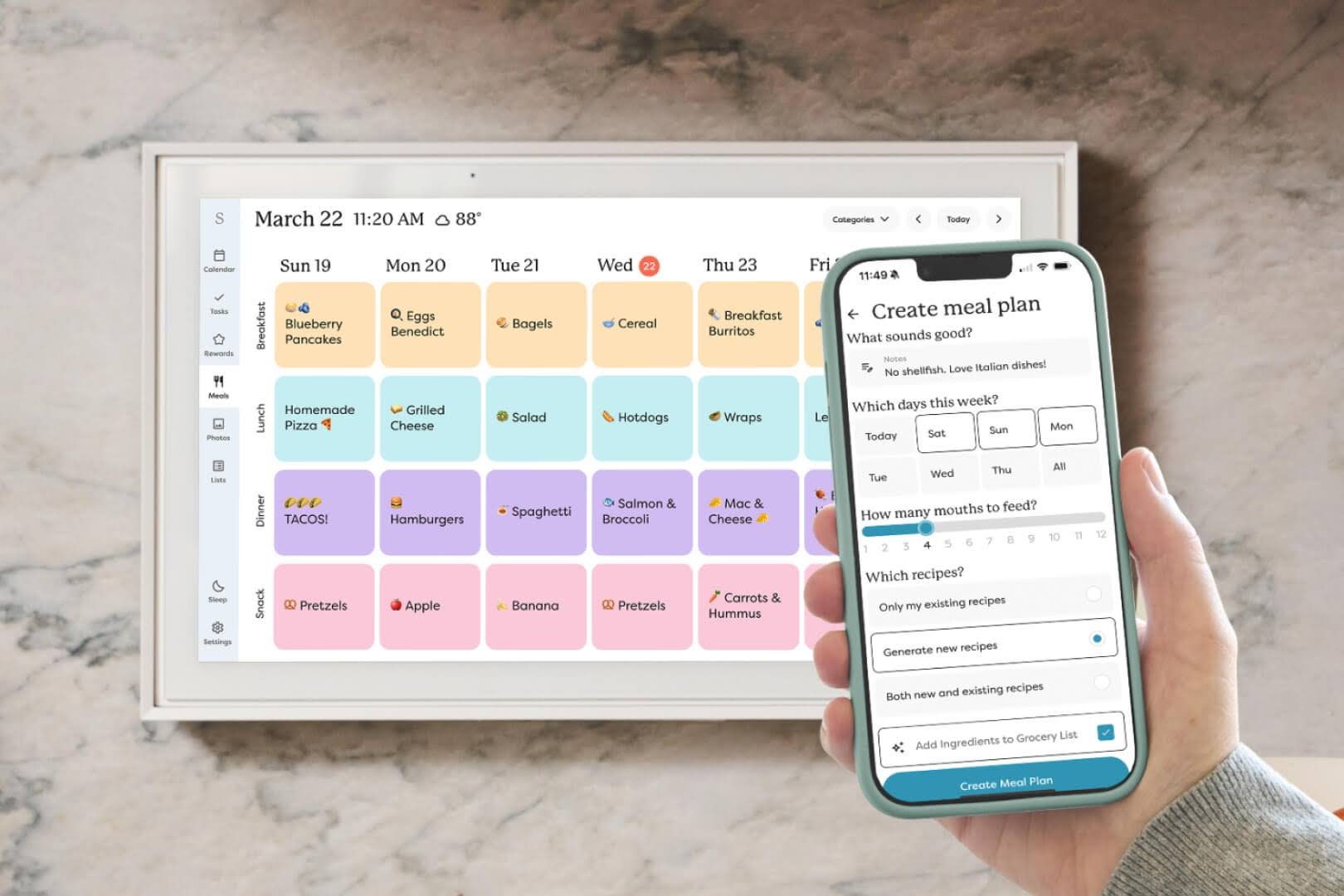
Calendar Plus includes a meal-planning feature that lets families organise breakfast, lunch, dinner and snacks and display the plan on the shared Calendar. Users can also save favourite recipes or use Skylight's smart functionality to create recipes and meal suggestions.
This includes Fridge Photo - take a photo of the contents of your fridge and let Side Kick generate recipe ideas from what you already have - it's as simple as that.
Again, this is less about replacing a dedicated recipe application and more about bringing another recurring household decision into the same system.
Instead of someone asking, 'What's for dinner?' every evening, the week's plan can already be visible.
That may sound like a small convenience, but reducing small decisions is arguably where a product like this earns its place in a busy household.
Is the Display Easy to Live With?
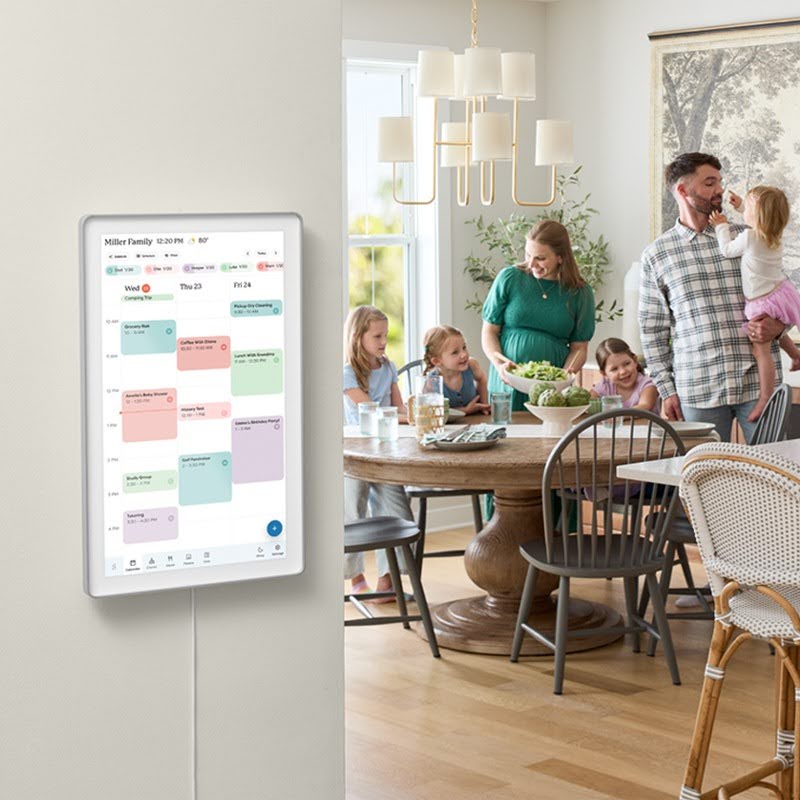
A family organiser needs to be visible without becoming another source of clutter.
The 15-inch Skylight Calendar offers a reasonably large 1920 x 1080 display, with an adjustable stand for countertop use and a wall-mount option.
The display can remain dedicated to household information during the day and use sleep mode at night. With Calendar Plus, it can also function as a photo or video display when it is not actively being used as a calendar.
That gives the device a secondary role in the home, although the photo-screen feature is a Plus-only addition.
The larger Calendar Max is another option for families that want a bigger shared display. Skylight currently offers a 27-inch version alongside its 15-inch models.
For most households, however, the 15-inch model is likely to be easier to integrate into an existing kitchen, hallway or family workspace.
What About the Cost?
The Skylight Calendar is not an inexpensive replacement for a paper calendar.
The current UK listing puts the 15-inch model at £290, while the 15-inch Calendar with Plus is currently offered at £275 with one free month of Plus. Calendar Plus then costs £60 per year.
That means the value proposition depends heavily on how much of the system a household will actually use.
If all you need is a shared calendar, there are cheaper ways to achieve that. A tablet, wall-mounted screen, or even a traditional paper planner can display a schedule.
Skylight's case is stronger for families that will use the broader ecosystem: synced calendars, chore charts, custom lists, meal planning, school-event importing, and the shared touchscreen experience.
There is also an important distinction between the basic product and Plus. The standard calendar retains features such as tasks, custom lists, calendar syncing, and the mobile app without requiring the subscription, while features including Magic Import and meal planning require Plus.
Who Is the Skylight Calendar For?
The Skylight Calendar is aimed squarely at busy families, and that focus is reflected in its feature set.
It makes the most sense for households where several people's schedules need to be coordinated, particularly families managing school activities, appointments, extracurricular clubs, chores, and shared responsibilities.
It could also appeal to co-parents or extended households that need to share information across locations, thanks to its sharing and device-linking capabilities.
For someone living alone or with a relatively simple schedule, however, the product could be more technology than they need. A phone calendar already handles most individual scheduling requirements.
The same applies to families that prefer managing everything digitally through existing apps. The value of Skylight is not necessarily that it does something a phone cannot do. Its advantage is making that information visible and shared.
What We Like
The strongest aspect of the Skylight Calendar is its centralised approach. It brings calendars, chores, lists and household information into a shared physical location instead of leaving everything hidden inside individual smartphones.
The colour coding is simple but effective, while calendar syncing means families can continue using services they already have.
The mobile app also prevents the physical display from becoming a limitation. Parents can make changes while away from home, while the main screen remains a shared reference point for everyone else.
The Skylight Calendar is designed to be a central household hub that helps little ones build healthy habits and routines. Building confidence and encouraging families to share responsibilities in a fun and engaging way.
Calendar Plus adds another layer of convenience, particularly through Magic Import and meal planning.
What Could Be Better
The biggest consideration is price.
At £290 for the 15-inch Calendar, this is a premium purchase for something that fundamentally revolves around scheduling. The £60 annual Plus subscription also means households need to decide whether the additional features justify the ongoing cost.
There is also the question of whether every family needs a dedicated screen.
If everyone already checks their schedules reliably and the household has little difficulty coordinating appointments and chores, the Skylight Calendar may not transform daily life enough to justify its cost.
Its usefulness grows with household complexity. The more calendars, children, activities, and recurring tasks a family has to coordinate, the more compelling the shared-display concept becomes.
Final Verdict
The Skylight Calendar is an example of technology solving a surprisingly ordinary problem: too much information spread across too many places.
Its touchscreen display turns individual schedules into a shared family view, while calendar syncing allows users to continue working with Google, Apple, Outlook, and other supported services. Tasks, chores, and custom lists expand its role beyond a conventional calendar, and Calendar Plus adds more ambitious features such as meal planning and Magic Import.
That makes it more than a digital replacement for a paper planner. It is designed as a central hub for family organisation, particularly in households where keeping everyone informed has become a job in itself.
The price means it won't make sense for everyone. But for families juggling school schedules, work commitments, appointments, activities, chores, and meals, having all of that information in one visible place could remove some of the daily mental load.
The Skylight Calendar doesn't eliminate the chaos of family life. What it can do is make that chaos easier for everyone to see, understand, and manage.
© Copyright IBTimes 2026. All rights reserved.